

Auto-generated listing text
Once you create a new listing and add all the required details and images, a draft of the listing text is automatically generated for you. You can use it right away or adjust it at any time to match your preferences.
How it works
While setting up your listing, simply provide the key information about your property – such as location, room size, features, and amenities. After entering the details and uploading at least three photos, our tool automatically generates a suitable title and listing description.
If you prefer, you can also trigger the text generation manually by clicking the “Create” button – this option works even without photos.
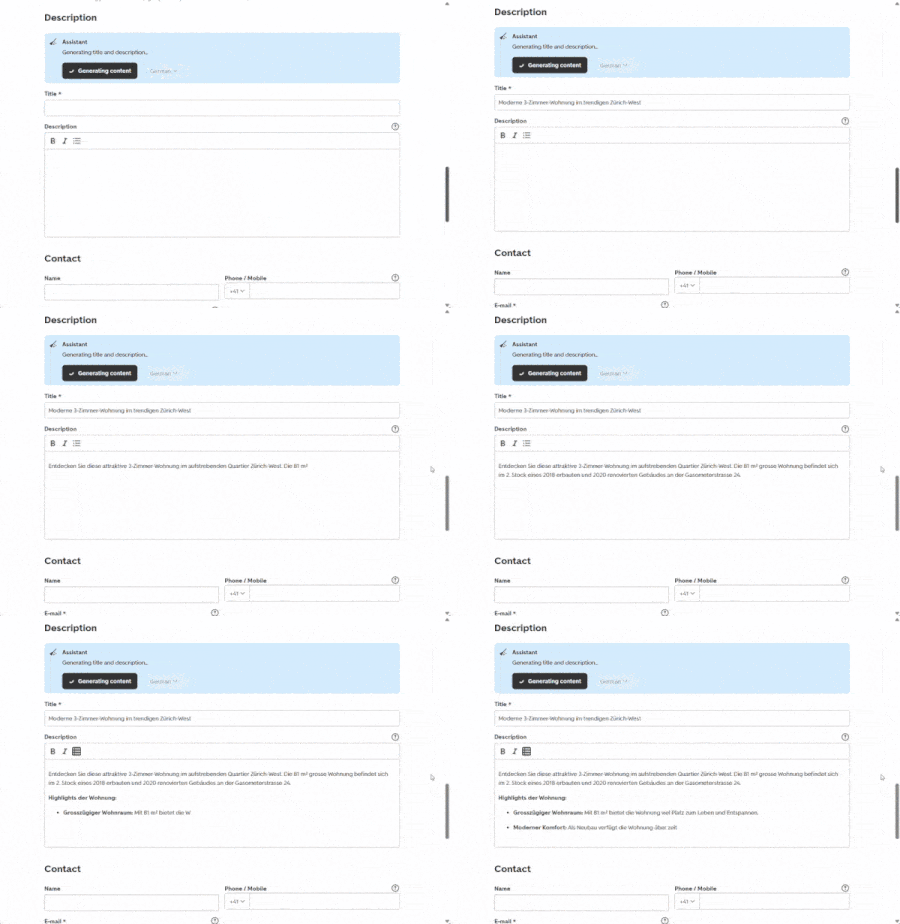
A practical example
Olivia wants to sell her apartment. She knows the number of rooms and the square footage, but isn’t quite sure how to craft a persuasive and engaging description. No worries: once she has entered the key details and uploaded the photos, the system automatically provides a suggested title and description. She makes a few quick adjustments to match her preferences – and the listing is complete. Quick, simple, efficient.
Your benefits at a glance
- Save time: no need to spend ages thinking about phrasing.
- Better wording: texts are clear, grammatically correct, and attractive.
- Easy to use: suggestions are generated automatically or with a single click.
- More attention for your listing: well-written texts help potential buyers get a clearer picture of your property and increase the likelihood of receiving inquiries.


